


The aim of the prcbench package is to provide a testing workbench for evaluating precision-recall curves under various conditions. It contains integrated interfaces for the following seven tools. It also contains predefined test data sets.
| Tool | Language | Link |
|---|---|---|
| precrec | R | Tool web site, CRAN |
| ROCR | R | Tool web site, CRAN |
| PRROC | R | CRAN |
| AUCCalculator | Java | Tool web site |
| PerfMeas | R | CRAN |
| yardstick | R | Tool web site, CRAN |
| sklearn | Python | Tool web site |
The sklearn tool uses a standalone Python module bundled with prcbench and derived from the scikit-learn source, so scikit-learn itself is not required. It does need the reticulate package, Python and numpy. Without them it returns a flat dummy curve instead of raising an error, so the predefined tool sets that contain it stay usable.
Timings of sklearn are not comparable with those of the R tools. Every call crosses the R/Python boundary and converts the input and output vectors, and that overhead is counted as part of the measurement. It often dominates the curve calculation itself on small test sets. Use run_benchmark to compare the R tools with each other, and read the sklearn row as the cost of calling Python from R rather than as the speed of the scikit-learn algorithm. Curve accuracy from run_evalcurve is unaffected.
Disclaimer: prcbench was originally develop to help our precrec library in order to provide fast and accurate calculations of precision-recall curves with extra functionality.
Accuracy evaluation of precision-recall curves
prcbench uses pre-defined test sets to help evaluate the accuracy of precision-recall curves.
-
create_toolset: creates objects of different tools for testing (7 different tools) -
create_testset: selects pre-defined data sets (c1, c2, and c3) -
run_evalcurve: evaluates the selected tools on the simulation data -
autoplot: shows the results withggplot2andpatchwork
## Load library
library(prcbench)

## Plot base points and the result of 7 tools on pre-defined test sets (c1, c2, and c3)
toolset <- create_toolset(c(
  "precrec", "ROCR", "AUCCalculator", "PerfMeas", "PRROC", "yardstick", "sklearn"
))
testset <- create_testset("curve", c("c1", "c2", "c3"))
scores1 <- run_evalcurve(testset, toolset)
autoplot(scores1, ncol = 4, nrow = 2)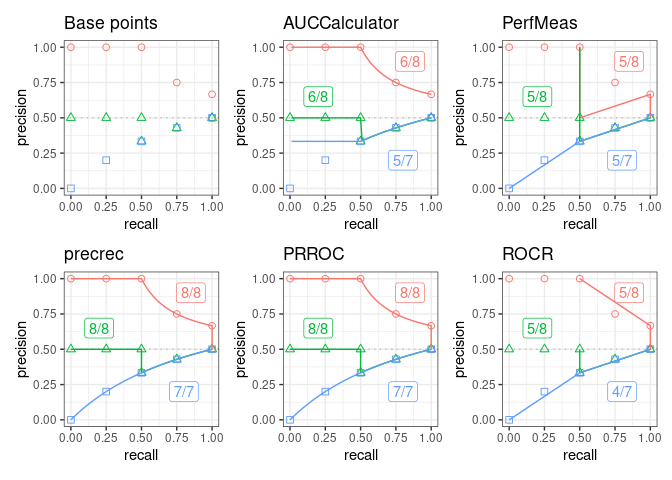
Running-time evaluation of precision-recall curves
prcbench helps create simulation data to measure computational times of creating precision-recall curves.
-
create_toolset: creates objects of different tools for testing -
create_testset: creates simulation data -
run_benchmark: evaluates the selected tools on the simulation data
## Load library
library(prcbench)

## Run benchmark for auc7 (7 tools) on four balanced test sets, from b100
## (50 positives and 50 negatives) up to b100000 (50,000 and 50,000)
toolset <- create_toolset(set_names = "auc7")
testset <- create_testset("bench", c("b100", "b1000", "b10000", "b100000"))
res <- run_benchmark(testset, toolset, unit = "s")

print(res)
Test sets for benchmarking are named by a prefix followed by a total size. The prefix b means balanced, half positives and half negatives, and i means imbalanced, a quarter positives. The number is how many data points the set holds, so b100 is 50 positives and 50 negatives, and b100000 is 50,000 of each.
The table holds the mean running time in seconds. Each column is one balanced test set, headed by the number of data points it contains. These numbers are recorded by data-raw/run_readme_benchmark.R and read from data-raw/readme_benchmark.csv, not measured while this page is knitted. Timing the tools on every knit made the numbers drift with whatever else the machine was doing, so the benchmark is re-run deliberately, when a wrapped tool changes or when there is a performance change worth showing.
| Tool | 100 | 1,000 | 10,000 | 100,000 |
|---|---|---|---|---|
| AUCCalculator | 0.00307 | 0.011 | 0.0977 | 5.96 |
| PerfMeas | 0.000126 | 0.000243 | 0.00155 | 0.0147 |
| precrec | 0.0062 | 0.00625 | 0.00786 | 0.029 |
| PRROC | 0.000256 | 0.000489 | 0.00306 | 0.0359 |
| ROCR | 0.00206 | 0.00383 | 0.0211 | 0.238 |
| sklearn | 0.000519 | 0.000791 | 0.0036 | 0.0367 |
| yardstick | 0.00189 | 0.0025 | 0.00826 | 0.0705 |
Recorded on 2026-09-25 with R version 4.6.1 (2026-06-24) on x86_64-pc-linux-gnu, 5 iterations per tool, using precrec 0.24.0, ROCR 1.0.12, PRROC 1.4, yardstick 1.4.0.
The sklearn row of the table includes the R/Python conversion overhead, so it measures the round trip rather than the scikit-learn algorithm. See the note above.
Documentation
Introduction to prcbench: a package vignette that contains the descriptions of the functions with several useful examples. View the vignette with
vignette("introduction", package = "prcbench")in R.Help pages: all the functions including the S3 generics have their own help pages with plenty of examples. View the main help page with
help(package = "prcbench")in R.
Installation
CRAN
install.packages("prcbench")Dependencies
AUCCalculator requires a Java runtime environment (>= 6) if AUCCalculator needs to be evaluated.
GitHub
You can install a development version of prcbench from our GitHub repository.
devtools::install_github("evalclass/prcbench")-
Make sure you have a working development environment.
Windows: Install Rtools (available on the CRAN website).
Mac: Install Xcode from the Mac App Store.
Linux: Install a compiler and various development libraries (details vary across different flavors of Linux).
Install
devtoolsfrom CRAN withinstall.packages("devtools").Install
prcbenchfrom the GitHub repository withdevtools::install_github("evalclass/prcbench").
Troubleshooting
microbenchmark
microbenchmark does not work on some OSs. prcbench uses system.time when microbenchmark is not available.
Citation
Precrec: fast and accurate precision-recall and ROC curve calculations in R
Takaya Saito; Marc Rehmsmeier
Bioinformatics 2017; 33 (1): 145-147.
External links
Classifier evaluation with imbalanced datasets: our web site that contains several pages with useful tips for performance evaluation on binary classifiers.
The Precision-Recall Plot Is More Informative than the ROC Plot When Evaluating Binary Classifiers on Imbalanced Datasets: our paper that summarized potential pitfalls of ROC plots with imbalanced datasets and advantages of using precision-recall plots instead.