The prcbench package is a testing workbench for
evaluating precision-recall curves, which requires simple three step
processes to perform evaluations of libraries that create
precision-recall plots.
Tool selection by using the tool interface
-
Test data selection/creation by using the test data interface
Select pre-defined test data for the accuracy evaluation
Define randomly generated test data for the running-time evaluation
-
Run a evaluation function with the selected tools and test data sets
Accuracy evaluation of precision-recall curves
Running-time evaluation of precision-recall curves
In addition to predefined tools and test data sets, the
prcbench package provides help functions for users to
define their own tools and datasets.
-
User-defined test data interface
User-defined test data for the accuracy evaluation
User-defined test data for the running-time evaluation
1. Tool interface
The prcbench package provides predefined interfaces for
the following seven tools that calculate precision-recall curves.
| Tool | Language | Link |
|---|---|---|
| precrec | R | Tool web site, CRAN |
| ROCR | R | Tool web site, CRAN |
| PRROC | R | CRAN |
| AUCCalculator | Java | Tool web site |
| PerfMeas | R | CRAN |
| yardstick | R | Tool web site, CRAN |
| sklearn | Python | Tool web site |
The sklearn tool is calculated by a standalone Python
module that is bundled with prcbench and derived from the
scikit-learn source code, so scikit-learn itself is not required.
Running it does require the reticulate package, a working
Python installation and numpy. When they are unavailable,
sklearn returns a flat dummy curve instead of raising an
error, in the same way as AUCCalculator does without
rJava, so the predefined tool sets stay usable on a machine
without Python.
Timings from run_benchmark are not comparable between
sklearn and the R tools. Every sklearn call
crosses the R/Python boundary and converts the input and output vectors,
and that overhead is counted as part of the measurement. On the small
test sets used here it often dominates the curve calculation itself. The
sklearn timing therefore measures the cost of the round
trip to Python rather than the speed of the scikit-learn algorithm.
Curve accuracy from run_evalcurve is unaffected, since it
does not depend on how long the calculation takes.
Create a tool set
The create_toolset function generates a tool set with a
combination of the seven tools.
library(prcbench)

## A single tool
toolsetA <- create_toolset("ROCR")

## Multiple tools
toolsetB <- create_toolset(c("PerfMeas", "PRROC"))

## Tool sets can be manually combined to a single set
toolsetAB <- c(toolsetA, toolsetB)
sklearn is a member of every predefined set, and it can
also be requested by name on its own. The following example is not
evaluated in this vignette, because it needs reticulate,
Python and numpy.
## The sklearn tool on its own
toolsetS <- create_toolset("sklearn")

## ... or combined with the R tools
toolsetRS <- create_toolset(c("precrec", "sklearn"))

## Curve evaluation works in the same way as it does for the other tools
run_evalcurve(create_testset("curve", c("c1", "c2", "c3")), toolsetRS)
Toolsklearn offers two AUC calculation methods.
aucType = 1, the default, uses average precision, which is
the summary scikit-learn recommends for precision-recall curves, whereas
aucType = 2 uses the trapezoidal rule.
## Use the trapezoidal rule instead of average precision
toolsklearn <- Toolsklearn$new(aucType = 2)
Arguments of the create_toolset function
The create_toolset function takes two additional
arguments - calc_auc and store_res.
calc_aucdecides whether tools calculate AUC score or not (Calculation of AUCs are optional for the running-time evaluation, but not necessary for the evaluation of accurate precision-recall curves)store_resdecides whether tools store the calculated curves or not (actual curves are required for the evaluation of accurate precision-recall curves)
Use predefined tool sets
The following twelve tool sets are predefined with a different combination of tools along with default argument values. The digit is the number of tools in the set, and each smaller set drops one more of the slower tools.
| Set name | Tools | calc_auc | store_res |
|---|---|---|---|
| def7 | ROCR, AUCCalculator, PerfMeas, PRROC, precrec, yardstick, sklearn | TRUE | TRUE |
| auc7 | ROCR, AUCCalculator, PerfMeas, PRROC, precrec, yardstick, sklearn | TRUE | FALSE |
| crv7 | ROCR, AUCCalculator, PerfMeas, PRROC, precrec, yardstick, sklearn | FALSE | TRUE |
| def6 | ROCR, AUCCalculator, PRROC, precrec, yardstick, sklearn | TRUE | TRUE |
| auc6 | ROCR, AUCCalculator, PRROC, precrec, yardstick, sklearn | TRUE | FALSE |
| crv6 | ROCR, AUCCalculator, PRROC, precrec, yardstick, sklearn | FALSE | TRUE |
| def5 | ROCR, PRROC, precrec, yardstick, sklearn | TRUE | TRUE |
| auc5 | ROCR, PRROC, precrec, yardstick, sklearn | TRUE | FALSE |
| crv5 | ROCR, PRROC, precrec, yardstick, sklearn | FALSE | TRUE |
| def4 | ROCR, precrec, yardstick, sklearn | TRUE | TRUE |
| auc4 | ROCR, precrec, yardstick, sklearn | TRUE | FALSE |
| crv4 | ROCR, precrec, yardstick, sklearn | FALSE | TRUE |
## Use 'set_names'
toolsetC <- create_toolset(set_names = "auc7")

## Multiple sets are automatically combined to a single set
toolsetD <- create_toolset(set_names = c("auc7", "crv4"))
2. Test data interface
The prcbench package provides two different types of
test data sets.
-
curve: evaluates the accuracy of precision-recall curves -
bench: measures running times of creating precision-recall curves
The create_testset function offers both types of test
data by setting the first argument either as “curve” or “bench”.
2a. Select pre-defined test data for the accuracy evaluation
The create_testset function takes predefined set names
for curve evaluation. These data sets contain pre-calculated precision
and recall values. The pre-calculated values must be correct so that
they can be compared with the results of specified tools.
The following four test sets are currently available.
| name | #scores&labels | #pos labels | #neg labels | expected #points | expected start | expected end |
|---|---|---|---|---|---|---|
| c1 | 4 | 2 | 2 | 6 | (0, 1) | (1, 0.5) |
| c2 | 4 | 2 | 2 | 6 | (0, 0.5) | (1, 0.5) |
| c3 | 4 | 2 | 2 | 6 | (0, 0) | (1, 0.5) |
| c4 | 8 | 4 | 4 | 9 | (0, 1) | (1, 0.5) |
## C1 test set
testset2A <- create_testset("curve", "c1")

## C2 test set
testset2B <- create_testset("curve", "c2")

## Test data sets can be manually combined to a single set
testset2AB <- c(testset2A, testset2B)

## Multiple sets are automatically combined to a single set
testset2C <- create_testset("curve", c("c1", "c2"))
2b. Create randomly generated test data for the running-time evaluation
The create_testset function uses a naming convention for
randomly generated data for benchmarking. The format is a prefix (‘b’ or
‘i’) followed by the number of dataset. The prefix ‘b’ indicates a
balanced dataset, whereas ‘i’ indicates an imbalanced dataset. The
number can be used with a suffix ‘k’ or ‘m’, indicating respectively
1000 or 1 million.
## A balanced data set with 50 positives and 50 negatives
testset1A <- create_testset("bench", "b100")

## An imbalanced data set with 2500 positives and 7500 negatives
testset1B <- create_testset("bench", "i10k")

## Test data sets can be manually combined to a single set
testset1AB <- c(testset1A, testset1B)

## Multiple sets are automatically combined to a single set
testset1C <- create_testset("bench", c("i10", "b10"))
3. Run a evaluation function with the selected tools and test data sets
The prcbench package currently provides two different
types of performance evaluation.
Accuracy evaluation of precision-recall curves
Running-time evaluation of precision-recall curves
3a. Accuracy evaluation of precision-recall curves
The run_evalcurve function evaluates precision-recall
curves with the following five test cases. The basic idea is that the
function returns the full score as long as the points generated by a
library matches with the manually calculated recall and precision
values.
| Test case | Description |
|---|---|
| fpoint | Check the first point |
| int_pts | Check the intermediate points |
| epoint | Check the end point |
| x_range | Evaluate a range between two recall values |
| y_range | Evaluate a range between two precision values |
Evaluation scores
The run_evalcurve function calculates the scores of the
test cases and summarizes them to a data frame.
## Evaluate precision-recall curves for ROCR and precrec with c1 test set
testset <- create_testset("curve", "c1")
toolset <- create_toolset(c("ROCR", "precrec"))
scores <- run_evalcurve(testset, toolset)
scores
## testset toolset toolname score
## 1 c1 precrec precrec 8/8
## 2 c1 ROCR ROCR 5/8The result of each test case can be displayed by specifying
data_type = all of the print
function.
## Print all results
print(scores, data_type = "all")
## testset toolset toolname testitem testcat success total
## 1 c1 precrec precrec x_range Rg 1 1
## 2 c1 precrec precrec y_range Rg 1 1
## 3 c1 precrec precrec fpoint SE 1 1
## 4 c1 precrec precrec intpts Ip 4 4
## 5 c1 precrec precrec epoint SE 1 1
## 6 c1 ROCR ROCR x_range Rg 1 1
## 7 c1 ROCR ROCR y_range Rg 1 1
## 8 c1 ROCR ROCR fpoint SE 0 1
## 9 c1 ROCR ROCR intpts Ip 2 4
## 10 c1 ROCR ROCR epoint SE 1 1Visualization of the result
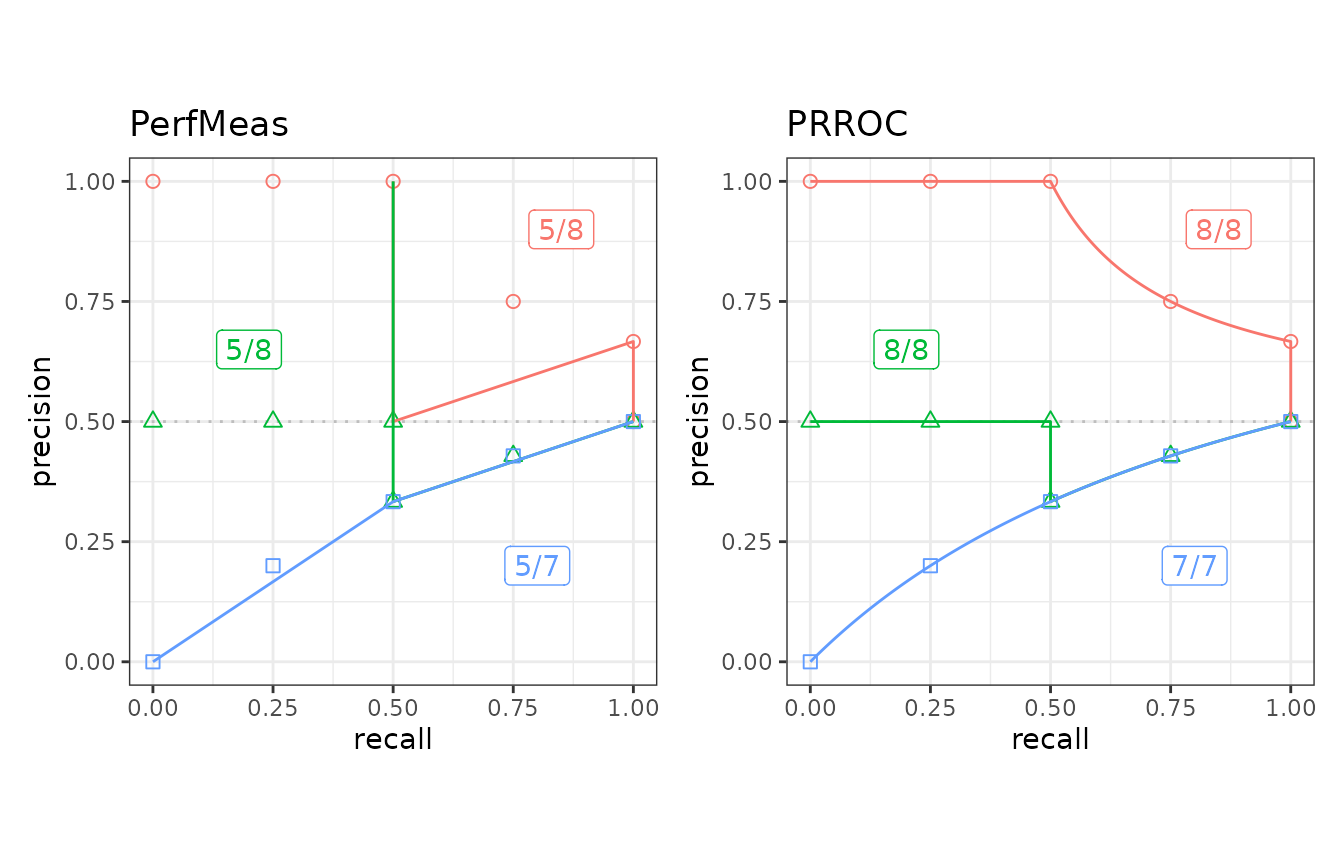
The autoplot shows a plot with the result of the
run_evalcurve function.
## ggplot2 is necessary to use autoplot
library(ggplot2)

## Plot base points and the result of precrec on c1, c2, and c3 test sets
testset <- create_testset("curve", c("c1", "c2", "c3"))
toolset <- create_toolset("precrec")
scores1 <- run_evalcurve(testset, toolset)
autoplot(scores1)

## Plot the results of PerfMeas and PRROC on c1, c2, and c3 test sets
toolset <- create_toolset(c("PerfMeas", "PRROC"))
scores2 <- run_evalcurve(testset, toolset)
autoplot(scores2, base_plot = FALSE)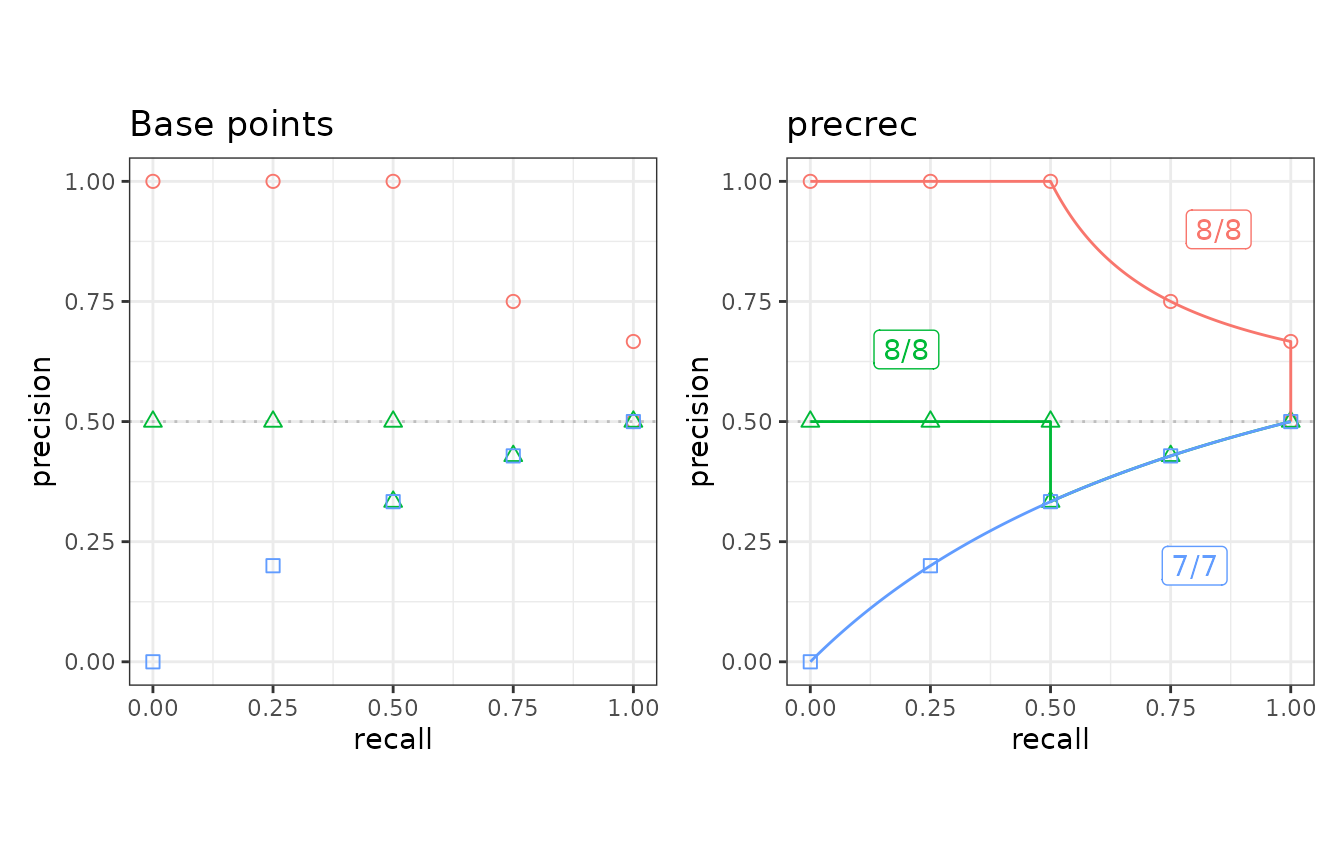
3b. Running-time evaluation of precision-recall curves
The run_benchmark function internally calls the
microbenchmark function provided by the microbenchmark
package. It takes a test set and a tool set and returns the result of
microbenchmark.
## Run microbenchmark for auc7 on b10
testset <- create_testset("bench", "b10")
toolset <- create_toolset(set_names = "auc7")
res <- run_benchmark(testset, toolset)
res
## testset toolset toolname min lq mean median uq max neval
## 1 b10 auc7 AUCCalculator 2.277 2.291 7.350 4.205 5.838 22.14 5
## 2 b10 auc7 PerfMeas 0.058 0.061 0.098 0.066 0.083 0.22 5
## 3 b10 auc7 precrec 5.718 5.743 6.024 5.810 5.932 6.92 5
## 4 b10 auc7 PRROC 0.148 0.161 0.195 0.174 0.175 0.32 5
## 5 b10 auc7 ROCR 1.648 1.658 1.783 1.665 1.781 2.16 5
## 6 b10 auc7 sklearn 0.386 0.411 2.045 0.419 0.521 8.49 5
## 7 b10 auc7 yardstick 1.596 1.621 6.149 1.668 9.505 16.36 5The sklearn row includes the R/Python conversion
overhead described in section 1, so it
should be compared with the other rows only with that caveat in
mind.
4. Create a user-defined tool
In addition to the predefined seven tools, users can add new tool
interfaces for their own tools to run benchmarking and curve evaluation.
The create_usrtool function takes a name of the tool and a
function for calculating a precision-recall curve.
## Create a new tool set for 'xyz'
toolname <- "xyz"
calcfunc <- create_example_func()
toolsetU <- create_usrtool(toolname, calcfunc)

## User-defined tools can be combined with predefined tools
toolsetA <- create_toolset("ROCR")
toolsetU2 <- c(toolsetA, toolsetU)
Like the predefined tool sets, user-defined tool sets can be used for
both run_benchmark and run_evalcurve.
## Curve evaluation
testset3 <- create_testset("curve", "c2")
scores3 <- run_evalcurve(testset3, toolsetU2)
autoplot(scores3, base_plot = FALSE)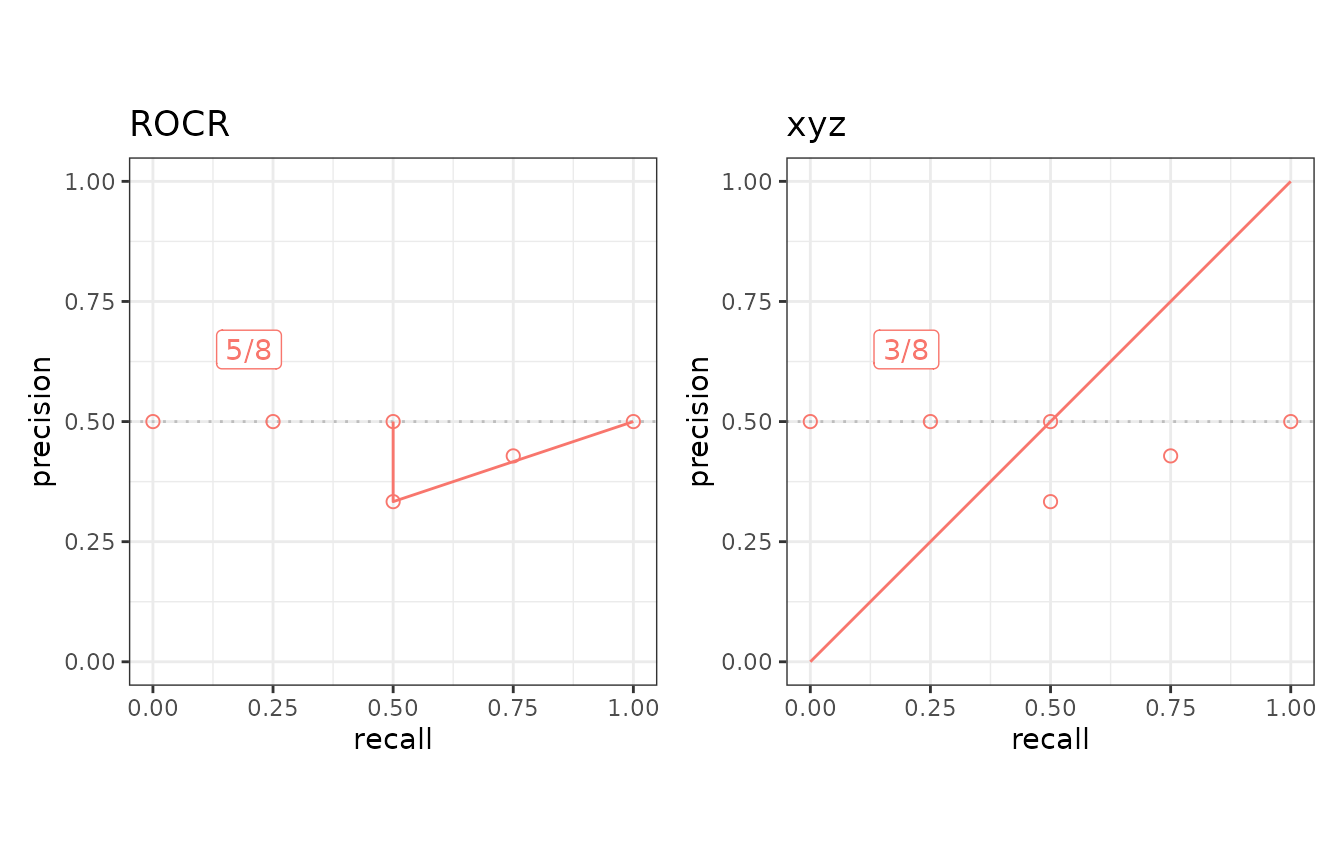
The format of the function for calculating a precision-recall curve
The create_example_func function creates an example for
the second argument of the create_usrtool function. The
actual function should also take a testset generated by the
create_testset function and returns a list with three
elements - x, y, and auc.
## Show an example of the second argument
calcfunc <- create_example_func()
print(calcfunc)
## function (single_testset)
## {
## scores <- single_testset$get_scores()
## list(x = seq(0, 1, 1/length(scores)), y = seq(0, 1, 1/length(scores)),
## auc = 0.5)
## }
## <bytecode: 0x55a9864fa9f0>
## <environment: 0x55a980abddd0>The create_testset function produces a
testset as either TestDataB or
TestDataC object. See the help files of the R6 classes -
help(TestDataB) and help(TestDataC) - for the
methods that can be used with the precision-recall calculation.
5. Create a user-defined test data
The prcbench package also supports user-defined test
data interfaces. The create_usrdata function creates two
types of test datasets.
User-defined test data for the accuracy evaluation
User-defined test data for the running-time evaluation
5a. User-defined test data for the accuracy evaluation
The first argument of the create_usrdata function should
be “curve” to create a test dataset for the accuracy evaluation. Scores
and labels as well as pre-calculated recall and precision values are
required. These pre-calculated values are used to compare with the
corresponding values predicted by the specified tools.
## Create a test dataset 'c5' for benchmarking
testsetC <- create_usrdata("curve",
  scores = c(0.1, 0.2), labels = c(1, 0),
  tsname = "c5", base_x = c(0.0, 1.0),
  base_y = c(0.0, 0.5)
)
It can be used in the same way as the predefined test datasets
selected by create_testset.
## Run curve evaluation for ROCR and precrec on a predefined test dataset
toolset2 <- create_toolset(c("ROCR", "precrec"))
scores2 <- run_evalcurve(testsetC, toolset2)
autoplot(scores2, base_plot = FALSE)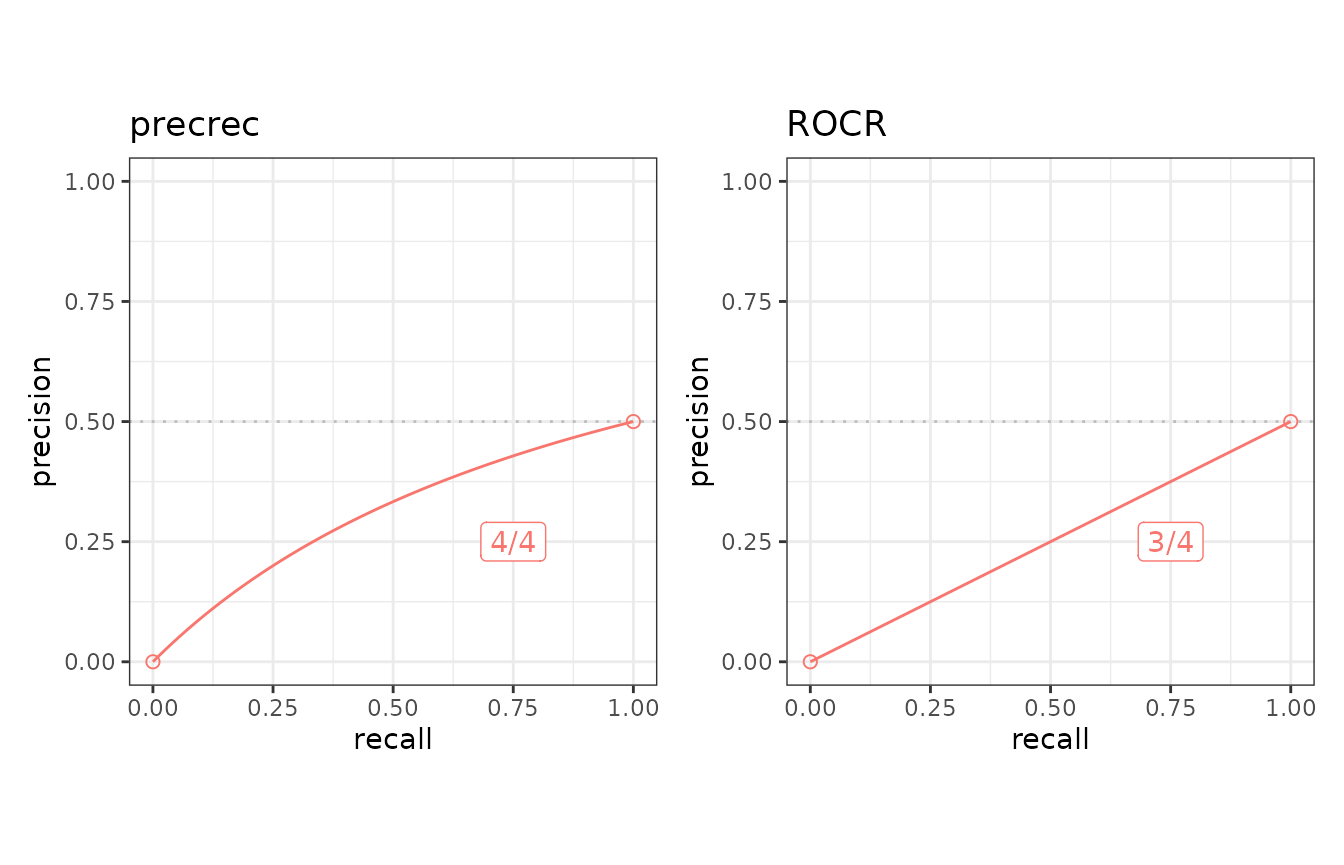
5b. User-defined test data for the running-time evaluation
The first argument of the create_usrdata function should
be “bench” to create a test dataset for the running-time evaluation.
Scores and labels are also required.
## Create a test dataset 'b5' for benchmarking
testsetB <- create_usrdata("bench",
  scores = c(0.1, 0.2), labels = c(1, 0),
  tsname = "b5"
)
It can be used in the same way as the test datasets generated by
create_testset.
## Run microbenchmark for ROCR and precrec on a predefined test dataset
toolset <- create_toolset(c("ROCR", "precrec"))
res <- run_benchmark(testsetB, toolset)
res
## testset toolset toolname min lq mean median uq max neval
## 1 b5 precrec precrec 5.7 5.8 6.1 5.8 6.1 7.2 5
## 2 b5 ROCR ROCR 1.7 1.7 1.9 1.8 1.9 2.4 56. External links
See our website, Classifier evaluation with imbalanced datasets, for useful tips for performance evaluation on binary classifiers. In addition, we have summarized potential pitfalls of ROC plots with imbalanced datasets. See our paper, The Precision-Recall Plot Is More Informative than the ROC Plot When Evaluating Binary Classifiers on Imbalanced Datasets, for more details.